Sunday, August 18, 2019

Search your own old tweets

Most often I would want to refer some of my old tweets. By old I meant 2-4 years back. I was unsure until someday, I learnt about this twitter advanced search.

https://twitter.com/search-advanced

The Search window


In here I can user my handle From these accounts: mrprajesh
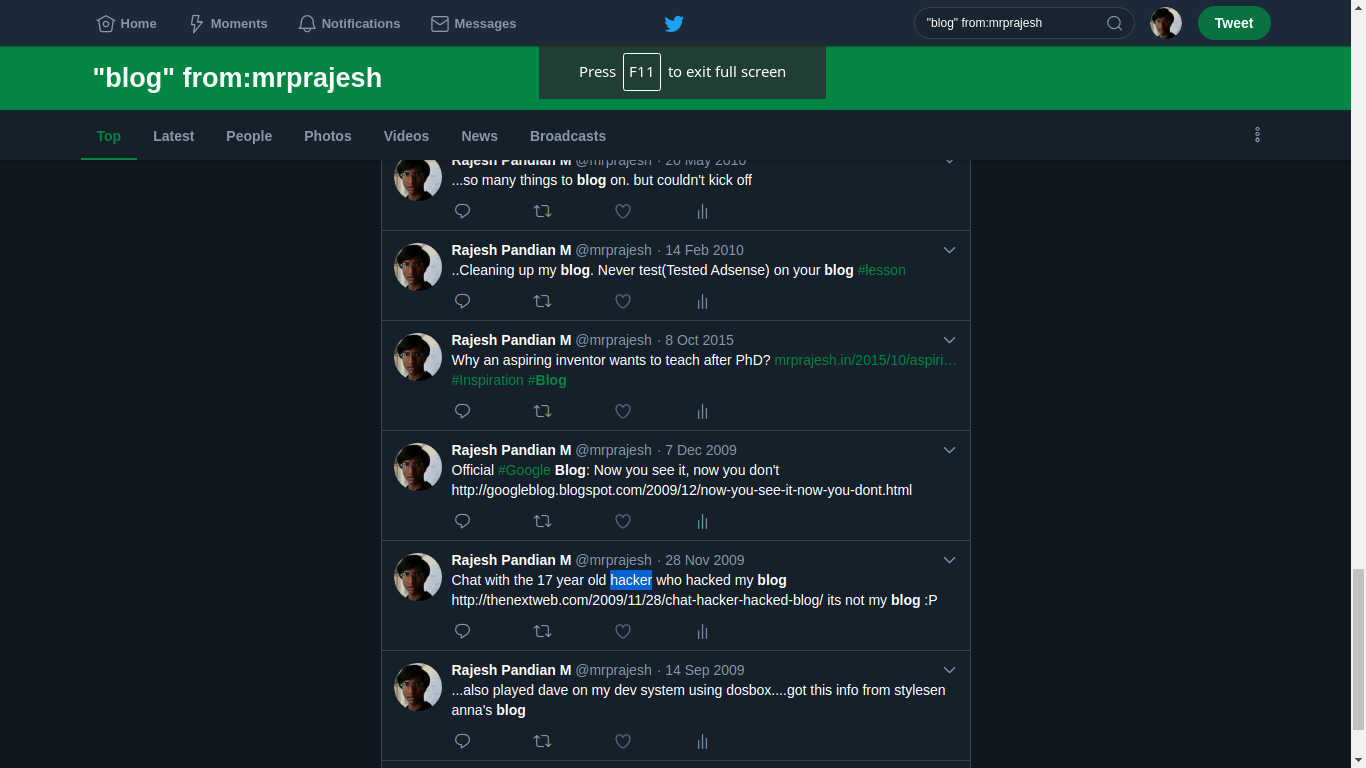
Then search for one or two word. This very handy. This what happen when tried to find blog keyword from my old tweets.


Yay!!
See you, tata.

Monday, July 15, 2019

How to build Green-Marl on Ubuntu 18.04 or later / Linux Mint 19

The offcial Green-Marl from Stanford is old at least 5 years(as on date). The master branch is not able to build/make sucessully. There were some errors and build got failed. Fortunately, I saw a pullrequest #132 by Reto Achermann @achreto and it works like charm.

$ mkdir achretoGreenMarl && cd achretoGreenMarl
$ git clone https://github.com/achreto/Green-Marl.git .
$ cd achretoGreenMarl
$ make

That's it. It works fine. You could check.

$ cd achretoGreenMarl/bin
$ ./gm_comp  -v
lib this = 0x5653e0f5dde0
version 0.3.0

TaTa bye.

what is green-marl? see this

The below was the error when building from https://github.com/stanford-ppl/Green-Marl

collect2: error: ld returned 1 exit status
Makefile:196: recipe for target '../bin/gm_comp' failed
make[1]: *** [../bin/gm_comp] Error 1
make[1]: Leaving directory '/home/rajz/d7/Green-Marl/src'
Makefile:49: recipe for target 'compiler' failed
make: *** [compiler] Error 2

Thursday, April 25, 2019

LaTeX Tips for writing good research article.

// Purely out of my experience(learnt from friends and experts) of using LaTeX
// for writing a good research article collaboratively; good -- In my view!
// good - easy for others to edit;


- use multiple src files and input in the main tex.
- - do not write the everything in a single file.
- - Prior to Overleaf this is modular. But even after this. it is a good practice.
e.g

\input{0ABS.tex}
\input{1INT.tex}
\input{3ALG.tex}

or  keep everything in a folder as well
\input{src/0ABS.tex}
..


- Use Overleaf is plain, simple and speeds up writing .
- - Good for collab; two persons can edit the same file simultaneously.
- - Enough of messing around with errors in texmaker[TM]/texstudio[TS]; bored of it!
- - Double click the pdf it will take you to the line or para(most of the time)!
- - Auto spell check // Never worked well TM


- User labels at a appropriate place(section, figure, subsection) with some standard form; prefix code
     \label{ intro}
e.g
     \label{fig description figure}
      I use codes ={sec, ssec, fig, table, alg, line, etc}

- Using ref and cite
- - Use it ~\ref{} or ~\cite{} so that it stays together with previous word.
- - \cite{r1,r2,r3...} can hold more than one args

- Use separate folder for fig and plot you generate.
- - Include all the source for creating image in case you wanted edit later.
- - I use Latex draw and export as pdf+cropped and include it in figure.
- - I use  pgPlot and Libre office calc for generating plots.

- Use BibTeX; User STD form in
- - use  \bibliography{GlobalBibtex} for file name GlobalBibtex.bib
- - can add mutiple bib file \bibliography{file1,file2}
- - Last name of first author and initials of rest(if any)
- - User _ write the name of paper you will calls as or would like remember as
- - overleaf can match it when citing with the name(after _) as well
- - It is always good to have your own global bibtex file
- - You ca cumulatively add(and maintain!) it as you write more.
- - Aid sin searching for bib entry in the bib file of you previously written papers.
- - Use only Conference verion of the  bib rather than a arviv if you have both.
- - Use DBLB for collection because it is nice search. You coul use others as well - but be uniform.
- - It will be nice if the bib entry has a doi/url
- - So the reader can quickly go to the ref paper in single click from the ref section.
- - Saves a lot of time in googling and find the right version(if multiple (re)versions exist), etc, etc,
- - Sometimes the CAPS may not rendered properly either in title/author name. You would have enclose those inside braces {} to force the capitalization in tact.

// I am updating these over the course of time.
Last Update: 14-Sep-2019

Monday, March 18, 2019

How to make your commits signed or verified in Github

DIY Steps
========
1. Create a GPG key (public and private key) and add it into passwords and keys (seahorse).

2. Add your GPG keys into Github
3. Create your SSH keys
ssh-keygen -t rsa -b 4096 -C "YOUR EMAIL@GMAIL.com"
// Remember the  passphrase it is essential to verified/sign
4. make sure that it is visible on your "passwords and keys"

5. Then On your terminal
cat ~/.ssh/id_rsa.pub

copy paste its content to Github

6. Set some git config if yor have not done earlier


7. That's it. Whenever you make a commit and push you will get a promt asking for pass phares (in step 3) and github credentials as usual respectively.

TADA

YOUR commits are now verified !!

Saturday, February 23, 2019

Installing Bika LIMS on Linux

 My brother wanted this for work. I am documenting for 
WARNING This procedure is incomplete and it DID NOT WORK!

1. download  and extract the latest zip https://github.com/bikalims/bika.lims/releases
 seems like bika is dead as per their github page. I got version 3.2.1rc2
2. run in terminal // probably needed dependicies for plone

sudo apt-get install python-setuptools python-dev build-essential libssl-dev libxml2-dev libxslt1-dev libbz2-dev libjpeg62-dev libz-dev

sudo apt-get install libreadline-dev wv poppler-utils


3. download latest stabe version of plone

https://plone.org/download

download  the unified installer (current v 5.1 did not work; try 4.3.11)

4.  extract and run insall.sh
select the isntall location and give a good admin pwd

You should see this once complete'
 
######################  Installation Complete  ######################

5.edit file buildout.cfg

eggs =
    Plone
    Pillow
    bika.lims
 

6: run bin/buildout
Ended with errors
7. ./bin/plonectl start
Ended with errors

4. Run this cmd after extracting it

sudo ./install.sh --target=/home/rajz/install/Plone43 --password=proot standalone

 
 5. Go to install location to edit the buildout.cfg config file /home/rajz/install/Plone43/zinstance ; add the hightligted line and save!  (you may use sudo nano buildout.cfg)
...
need-sudo = yes
index=https://pypi.python.org/simple/

--

eggs =
    Plone
    Pillow
    bika.lims
 
6.run sudo -u plone_buildout bin/buildout
//ignore dep erros

7. sudo bin/plonectl start
// errors


Wednesday, January 16, 2019

Installing LonestarGPU v3.0 on Linux Mint / Ubuntu & Errors faced during installation

These are the steps for installing.
1. Clone the release 3 repo.
git clone -b release-3.0 https://github.com/IntelligentSoftwareSystems/GaloisGPU
2. Next 
cd GloisGPU
make
../../rt/include/cutil_subset.h:10:10: fatal error: cub/cub.cuh: No such file or directory
 #include "cub/cub.cuh"
compilation terminated

This errors are due to as we have not the linked the dependencies. cub and moderngpu

3. I am using moderngpu v1.1 and cub v1.4.1 and you can download from the cub and moderngpu from the release tab.

rajz@LordOfWarriors:~/d6$ cd GaloisGPU
rajz@LordOfWarriors:~/d6/GaloisGPU$ ls -l
total 36
drwxr-xr-x 9 rajz rajz 4096 Jan 16 12:15 apps
drwxr-xr-x 2 rajz rajz 4096 Jan 16 13:37 bin
drwxr-xr-x 2 rajz rajz 4096 Jan 16 12:15 include
-rw-r--r-- 1 rajz rajz 1504 Jan 16 12:15 LICENSE.txt
-rw-r--r-- 1 rajz rajz  919 Jan 16 12:15 Makefile
-rw-r--r-- 1 rajz rajz 1967 Jan 16 12:15 README.md
drwxr-xr-x 5 rajz rajz 4096 Jan 16 12:15 rt
drwxr-xr-x 2 rajz rajz 4096 Jan 16 12:15 skelapp
drwxr-xr-x 3 rajz rajz 4096 Jan 16 12:15 tuning


// unlink the dep if present
unlink cub
unlink mgpu
 
ln -s /home/rajz/install/cub-1.4.1/ cub
ln -s /home/rajz/install/

// unlink the dep if present
unlink cub
unlink mgpu

cd rt/include/
ln -s /home/rajz/install/cub-1.4.1/cub/
ln -s /home/rajz/install/moderngpu-1.1/ mgpu

After linking, it should look like this.
rajz@LordOfWarriors:~/d6/GaloisGPU$ ls -l
total 40
drwxr-xr-x 9 rajz rajz 4096 Jan 16 12:15 apps
drwxr-xr-x 2 rajz rajz 4096 Jan 16 14:52 bin
lrwxrwxrwx 1 rajz rajz   29 Jan 16 14:37 cub -> /home/rajz/install/cub-1.4.1/
drwxr-xr-x 2 rajz rajz 4096 Jan 16 12:15 include
drwxr-xr-x 2 rajz rajz 4096 Jan 16 14:27 inputs
-rw-r--r-- 1 rajz rajz 1504 Jan 16 12:15 LICENSE.txt
-rw-r--r-- 1 rajz rajz  919 Jan 16 12:15 Makefile
lrwxrwxrwx 1 rajz rajz   33 Jan 16 14:38 mgpu -> /home/rajz/install/moderngpu-1.1/
-rw-r--r-- 1 rajz rajz 1967 Jan 16 12:15 README.md
drwxr-xr-x 5 rajz rajz 4096 Jan 16 12:15 rt
drwxr-xr-x 2 rajz rajz 4096 Jan 16 12:15 skelapp
drwxr-xr-x 3 rajz rajz 4096 Jan 16 12:15 tuning


rajz@LordOfWarriors:~/d6/GaloisGPU/rt/include$ ls -l
total 148
-rw-r--r-- 1 rajz rajz  2831 Jan 16 12:15 abitset.h
-rw-r--r-- 1 rajz rajz  4929 Jan 16 12:15 aolist.h
-rw-r--r-- 1 rajz rajz   219 Jan 16 12:15 bmk2.h
-rw-r--r-- 1 rajz rajz  6057 Jan 16 12:15 component.h
-rw-r--r-- 1 rajz rajz  4274 Jan 16 12:15 counter.h
-rw-r--r-- 1 rajz rajz  4167 Jan 16 12:15 csr_graph.h
lrwxrwxrwx 1 rajz rajz    33 Jan 16 14:43 cub -> /home/rajz/install/cub-1.4.1/cub/
-rw-r--r-- 1 rajz rajz 14929 Jan 16 12:15 cuda_launch_config.hpp
-rw-r--r-- 1 rajz rajz  2138 Jan 16 12:15 cutil_subset.h
-rw-r--r-- 1 rajz rajz  2092 Jan 16 12:15 exclusive.h
-rw-r--r-- 1 rajz rajz   633 Jan 16 12:15 failfast.h
-rw-r--r-- 1 rajz rajz  5145 Jan 16 12:15 gbar.cuh
-rw-r--r-- 1 rajz rajz   144 Jan 16 12:15 ggc_rt.h
-rw-r--r-- 1 rajz rajz   365 Jan 16 12:15 ggcuda.h
-rw-r--r-- 1 rajz rajz  1793 Jan 16 12:15 gg.h
-rw-r--r-- 1 rajz rajz  2621 Jan 16 12:15 instr.h
-rw-r--r-- 1 rajz rajz  3510 Jan 16 12:15 internal.h
-rw-r--r-- 1 rajz rajz  2114 Jan 16 12:15 lockarray.h
lrwxrwxrwx 1 rajz rajz    33 Jan 16 14:43 mgpu -> /home/rajz/install/moderngpu-1.1/
-rw-r--r-- 1 rajz rajz  4630 Jan 16 12:15 pipe.h
-rw-r--r-- 1 rajz rajz  1116 Jan 16 12:15 rv.h
-rw-r--r-- 1 rajz rajz  4139 Jan 16 12:15 sharedptr.h
-rw-r--r-- 1 rajz rajz   359 Jan 16 12:15 snfile.h
-rw-r--r-- 1 rajz rajz  2999 Jan 16 12:15 Timer.h
-rw-r--r-- 1 rajz rajz 18012 Jan 16 12:15 worklist.h


4. Now do a make from GloisGPU folder.

rajz@LordOfWarriors:~/install/GaloisGPU$ make

5. Now, the error is different

../../rt/include/cub/block/specializations/../../block/../util_ptx.cuh(694): warning: function "__all"
/usr/local/cuda-9.2/bin/..//include/device_atomic_functions.h(181): here was declared deprecated ("__all() is deprecated in favor of __all_sync() and may be removed in a future release (Use -Wno-deprecated-declarations to suppress this warning).")

../../rt/include/cub/block/specializations/../../block/../util_ptx.cuh(720): warning: function "__any"
/usr/local/cuda-9.2/bin/..//include/device_atomic_functions.h(180): here was declared deprecated ("__any() is deprecated in favor of __any_sync() and may be removed in a future release (Use -Wno-deprecated-declarations to suppress this warning).")

../../rt/include/cutil_subset.h(44): warning: function "__ballot"
/usr/local/cuda-9.2/bin/..//include/sm_20_intrinsics.h(407): here was declared deprecated ("__ballot() is deprecated in favor of __ballot_sync() and may be removed in a future release (Use -Wno-deprecated-declarations to suppress this warning).")

../../rt/include/cutil_subset.h(52): warning: function "__ballot"
/usr/local/cuda-9.2/bin/..//include/sm_20_intrinsics.h(407): here was declared deprecated ("__ballot() is deprecated in favor of __ballot_sync() and may be removed in a future release (Use -Wno-deprecated-declarations to suppress this warning).")

../../rt/include/mgpu/include/kernels/../device/../device/intrinsics.cuh(112): warning: function "__shfl_up(float, unsigned int, int)"
/usr/local/cuda-9.2/bin/..//include/sm_30_intrinsics.hpp(260): here was declared deprecated ("__shfl_up() is deprecated in favor of __shfl_up_sync() and may be removed in a future release (Use -Wno-deprecated-declarations to suppress this warning).")

../../rt/include/mgpu/include/kernels/../device/../device/intrinsics.cuh(122): warning: function "__shfl_up(int, unsigned int, int)"
/usr/local/cuda-9.2/bin/..//include/sm_30_intrinsics.hpp(174): here was declared deprecated ("__shfl_up() is deprecated in favor of __shfl_up_sync() and may be removed in a future release (Use -Wno-deprecated-declarations to suppress this warning).")

../../rt/include/mgpu/include/kernels/../device/../device/intrinsics.cuh(123): warning: function "__shfl_up(int, unsigned int, int)"
/usr/local/cuda-9.2/bin/..//include/sm_30_intrinsics.hpp(174): here was declared deprecated ("__shfl_up() is deprecated in favor of __shfl_up_sync() and may be removed in a future release (Use -Wno-deprecated-declarations to suppress this warning).")
/usr/bin/ld: ../../rt/lib/libggrt.a(ggc_rt.o): relocation R_X86_64_32 against `.rodata.str1.8' can not be used when making a PIE object; recompile with -fPIC
/usr/bin/ld: ../../rt/lib/libggrt.a(ggc_rt.link.o): relocation R_X86_64_32S against `__nv_module_id' can not be used when making a PIE object; recompile with -fPIC
/usr/bin/ld: ../../rt/lib/libggrt.a(instr.o): relocation R_X86_64_32 against `.rodata.str1.8' can not be used when making a PIE object; recompile with -fPIC
/usr/bin/ld: ../../rt/lib/libggrt.a(bmk2.o): relocation R_X86_64_32 against `.rodata.str1.1' can not be used when making a PIE object; recompile with -fPIC
/usr/bin/ld: final link failed: Nonrepresentable section on output
collect2: error: ld returned 1 exit status
Makefile:18: recipe for target 'dmr' failed
make[1]: *** [dmr] Error 1
make[1]: Leaving directory '/home/rajz/install/GaloisGPU/apps/dmr'
Makefile:12: recipe for target 'all' failed
make: *** [all] Error 2


Monday, December 10, 2018

Time synchronization issues in Dual boot Linux Mint/Ubuntu and Windows

I have always used to have the network time in my Linux Mint 19 or Windows 8. However when I switch between Linux and Windows[or vice versa] the time gets modified and wrong time would show up. This Time synchronization issues in Linux Mint/Ubuntu which can be solved by the following simple task.

Steps.
1. Use your favorite editor to edit the file as root [If file not found create a new one]. I am using xed here.

sudo xed /etc/adjtime

2. Make the file looks as below. For me, I had only the first line. I created the next two line and saved it.

0.0 0 0.0
0
LOCAL


3. Reboot!

The issues exactly what is happening in the background is very well explained in this reference article.

References: https://www.techgainer.com/fix-windows-showing-wrong-time-in-linux-windows-dual-boot-system/

Last Post !! Moved to new site

As I am getting old 😋, it seem like I can not remember many of my earlier tech encounters. This is the place I was logging so that I refer ...